


Nest
3.8130.69K Reviews
App Specs
- Version
- 5.88.0.2
- Updated On
- License
- Free
- Downloads
- 10,000,000+
- Developer
- Nest Labs Inc.
- Categories
- Lifestyle
- Platform
- Android, iOS
Screenshots
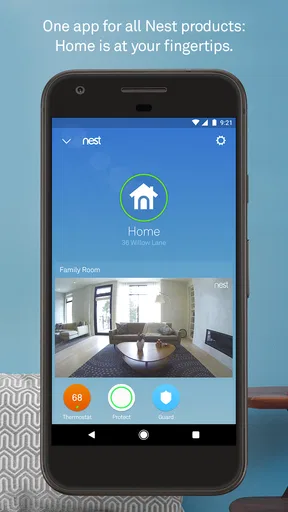
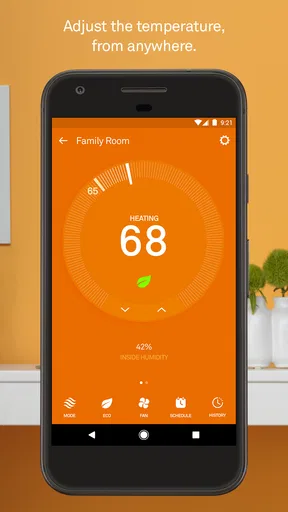
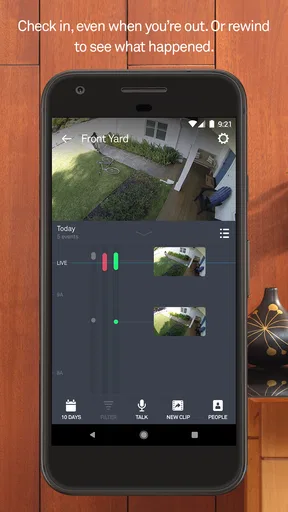
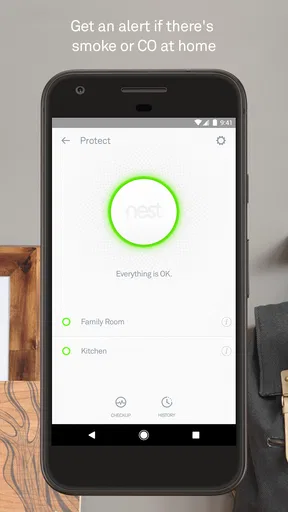
 Analysis by AppCompare
Before I let a home-management app influence heating or a camera routine, I want to know what kind of control I actually have. Nest is a lifestyle app from Nest Labs Inc., built around managing compatible home devices from a phone. That makes it useful, but also more personal than a typical shopping or entertainment app: the choices you make can relate to your home, daily routines, and the moments you check in while away.
My cautious approach is to treat the app as a control panel, not as a reason to connect every device or enable every option. I’d start with the device I most want to manage, learn what the app asks me to do during setup, and add anything else only when there’s a clear benefit. That keeps the experience easier to understand and makes it simpler to decide whether the setup feels right for your household.
Start with the device, not the promise
Before installing, I’d ask a practical question: do I already have a compatible Nest device, or am I planning to buy one? The app’s value depends on having something to control; without that, there is little reason to expect it to replace a general smart-home hub. If you are comparing options, check that the particular device you own is supported and consider whether you want to manage it from a phone in the first place.
That distinction matters because “smart home” can mean very different things. A thermostat workflow is about temperature adjustments, while a camera workflow is about viewing a space. I wouldn’t assume that every model offers the same controls or that every feature mentioned in a general discussion applies to every device. Starting with one clear use case makes the app easier to evaluate than buying several products and hoping they fit together.
What to notice during setup
During setup, take your time with the choices the app presents. Read each screen rather than tapping through simply to get to the main interface, especially when a step concerns account access, notifications, or connecting a device. The important question is not just whether setup finishes, but whether you understand how you will use the controls afterward.
I’d also make a note of which household members need access and what each person needs to do. Shared access can make day-to-day management more convenient, but it is worth agreeing on who should be able to change settings or view a camera. A short conversation at the start can prevent confusion later, particularly in a home where one person expects a setting to stay fixed and another regularly adjusts it.
Trust is a practical decision
I can’t judge an app’s privacy practices from its broad purpose alone, so I wouldn’t make sweeping claims about what it collects or how it handles information. What I can recommend is paying attention to the permissions and account choices shown on your own device, then deciding whether each one fits the way you plan to use Nest. If something seems unnecessary for your intended setup, pause and look for an alternative path before proceeding.
Worth Reading Before You Choose

Flipboard Shows What News Apps Must Do Beyond the Feed

Switching to Android Auto Means Rethinking Your Driving Routine

Google Calendar Makes a Crowded Week Easier to Manage

Ludo King Makes the Most of the Minutes Between Plans

Baby Panda World Brings Quick Play to Modern Phones, but Its Game Library Feels Busy

ESPN’s Live Game View Makes Following Close Games Easier
Notifications deserve the same thought. Alerts can be helpful when you genuinely want to know about a device event, but constant prompts can become noise, and a notification is not a substitute for checking a device directly when the situation matters. I prefer to enable only the alerts that have a clear purpose, then revisit them after living with the setup for a few days.
Where it fits—and where it doesn’t
Nest makes most sense for someone who already owns compatible equipment and wants phone-based access without managing each device through a separate routine. It may be less appealing if you prefer physical controls, do not want home devices tied to an app account, or are choosing a system mainly for broad compatibility across brands. In those cases, compare the exact devices and management options before committing rather than relying on a general promise of integration.
For a careful first test, I’d pick one ordinary task, such as checking a camera while away or changing a thermostat setting before coming home. Notice how many steps it takes, whether the controls are clear, and whether the app asks for access you are comfortable granting. That small trial tells you more about whether it suits your habits than a long list of possible smart-home uses.
It also helps to decide what “working well” means for you. A thermostat user might value a quick adjustment more than extensive customization; someone checking a camera may care more about a clear path to the live view and sensible alert settings. If the app adds friction to the one task you bought a device for, the wider feature set may not make up for it.
Ever feel like your home is just a bit too... well, manual? Enter the world of smart home tech with Nest, a game-changer for anyone looking to bring their living space into the 21st century. I’ve taken a deep dive into this app, and let me tell you, it’s a whole new level of convenience.
Getting Started with Nest
First things first, downloading the app is a breeze. Available on both Android and iOS, it’s just a quick search and tap away. Once installed, you’re greeted with a sleek, user-friendly interface that feels intuitive even if you’re not tech-savvy. Setting up your devices is straightforward. Just follow the in-app instructions, and you’ll have your thermostat, cameras, and other gadgets synced up in no time.
The Smart Home Experience
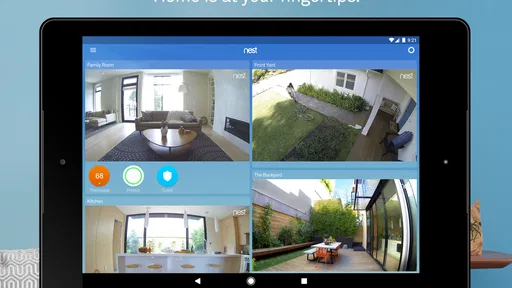
What really sets Nest apart is how it integrates various smart home devices into one seamless ecosystem. Imagine adjusting your home’s temperature from your phone while you’re still in bed. Or checking in on your home with the Nest Cam while you’re away. It’s not just convenient; it’s like living in the future.
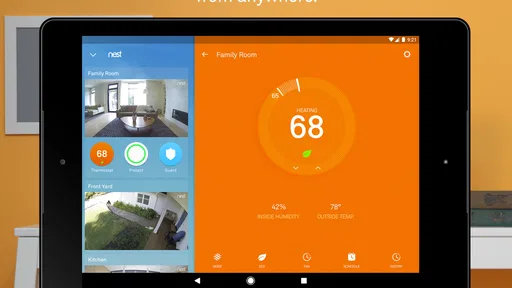
Let’s talk thermostats. Nest’s learning thermostat is like having a personal assistant. It learns your schedule and adjusts the temperature accordingly. Forgot to turn off the heat before leaving? No worries. The app’s got your back. You can make adjustments from anywhere, and the energy-saving features are a bonus for both your wallet and the environment.
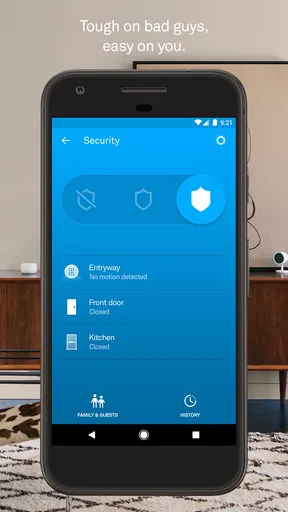
Security at Your Fingertips
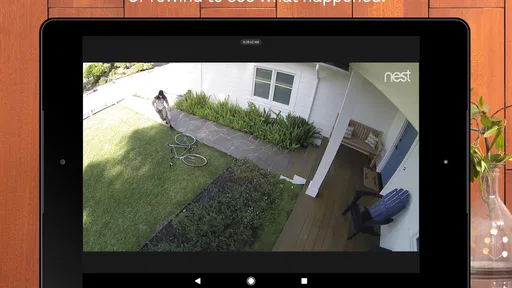
Security is a big deal for most of us, and Nest doesn’t disappoint. The Nest Cam provides live video streaming, so you can keep an eye on things from wherever you are. The video quality is crystal clear, and the app sends alerts if it detects any unusual activity. It’s peace of mind right in your pocket.
Connectivity and Compatibility
One of the app's strengths is its compatibility with a wide range of devices. Whether you’re using it with Google Assistant or Alexa, Nest fits right in. The app supports multiple users, making it easy for everyone in the household to access and control devices. Plus, the regular software updates mean you’re always getting the latest features and improvements.
And let’s not forget about the app’s integration with other smart devices. Whether it’s smart lights, locks, or even your fridge, Nest is designed to communicate and collaborate, creating a cohesive smart home experience that’s both efficient and enjoyable.
The User Experience
Now, no app is perfect, and Nest does have a learning curve, especially if you’re new to smart home technology. But the app’s design makes it pretty easy to get the hang of things. The menus are well-organized, and the setup process is guided and supportive. For those who love tinkering or want to dive into the settings, Nest offers plenty of options to customize each device to your liking.
Customer support is also worth mentioning. If you hit a snag, the Nest support team is responsive and helpful, making sure any issues are resolved promptly.
Final Thoughts
In a world where convenience is king, the Nest app really shines. It’s more than just a tool; it’s like having an assistant that manages the nitty-gritty of home management so you can focus on what matters. Whether you’re starting your journey into smart home tech or looking to expand your existing setup, Nest is a solid choice. It’s not just about making life easier; it’s about enhancing how you interact with your home.
For context, Nest is free, has an Everyone age rating, and runs on Android 8.0 or later. Its current version is 5.87.0.1. It has a 3.8 average from around 445,000 ratings, with over 10 million installs. Those figures suggest a well-established app, though they don’t tell me whether a particular device or household setup will suit you. I’d use them as background, not as a substitute for checking compatibility and testing the controls that matter to you.
Ready to take the plunge into smarter living? Nest is definitely worth a look. You might just wonder how you ever managed without it.
Pros
- User-friendly interface with intuitive navigation.
- Seamless integration with smart home devices.
- Energy-saving features reduce utility bills.
- Real-time alerts for home activity.
- Remote control from anywhere via smartphone.
Cons
- Requires a stable internet connection.
- Some features need a subscription.
- Initial setup can be complex.
- Limited compatibility with older devices.
- Can drain smartphone battery quickly.
FAQs for Nest
What are the main features of the Nest app?
The Nest app offers a variety of features designed to enhance home automation and security. Users can control Nest thermostats, cameras, and alarms remotely. It provides real-time alerts, energy usage reports, and integration with Google Assistant for voice control. Additionally, it supports multi-user access, allowing different family members to manage the devices.
Is the Nest app compatible with all smartphones and devices?
The Nest app is compatible with both Android and iOS devices. However, it requires a minimum operating system version—typically Android 5.0 or later and iOS 12.0 or later. It’s advisable to check the app store for the specific compatibility requirements to ensure a smooth installation and full functionality.
How secure is the Nest app in terms of protecting user data?
Nest prioritizes user security by implementing strong encryption standards to protect data transmitted between devices and the cloud. The app supports two-factor authentication, providing an added layer of security. Google’s robust privacy policies also govern data handling and storage, ensuring user information is safeguarded.
Does the Nest app require a subscription for full functionality?
While the basic functionalities of the Nest app are available for free, some features, such as extended video storage and advanced alerts, require a Nest Aware subscription. This service provides additional benefits like continuous video recording and customized activity zones, enhancing the overall user experience.
Can the Nest app integrate with other smart home devices?
Yes, the Nest app is designed to work seamlessly with a variety of smart home devices. It integrates well with Google Home, allowing users to control devices using voice commands. It also supports third-party smart home platforms, making it versatile for users with diverse home automation systems.


